Article
12 common invoice mistakes that delay payment (and fixes)
The 12 invoice mistakes that delay payment or get bills rejected, from vague line items to missing tax details, with quick fixes to apply before you send.
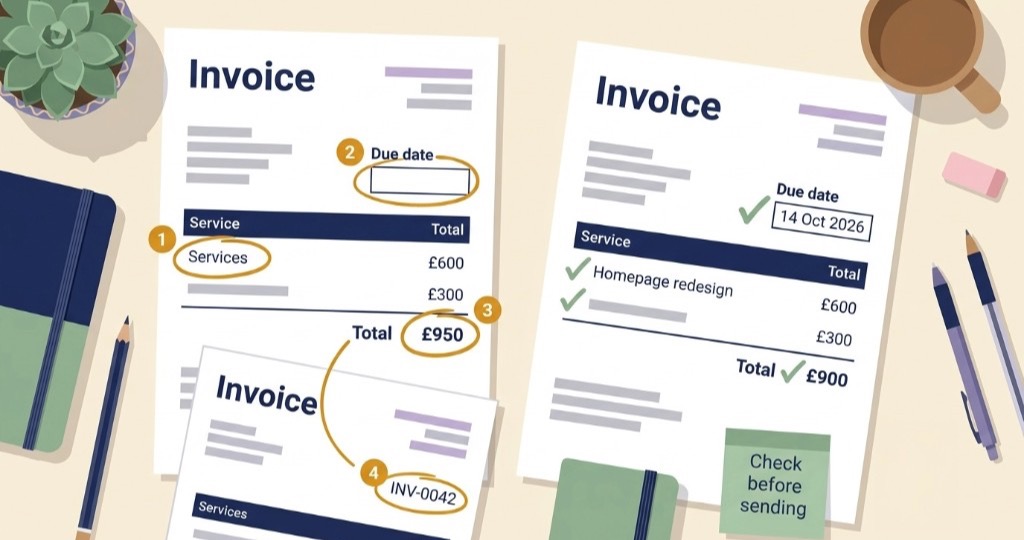
Short answer: most invoice mistakes occur due to missing or mismatched details. The big ones are vague line items, no real due date, missing payment details, the wrong client name or PO, totals that don’t add up, getting tax wrong, and sending the invoice late. Almost all of them take a minute to fix before you hit send, and a week or more to fix after.
Late payments are rarely a mystery. Most of the time, the invoice was unclear or had a mistake, and the client’s team had to stop and work out what it meant. Fix the pattern once and your payments usually speed up without a single awkward chase email.
This post is about what goes wrong and how to fix it. If you want to see what a good invoice looks like, read what makes a professional invoice. If you’re building one from scratch, start with how to make an invoice.
Mistakes on the invoice itself
1. Vague line items
“Services” or “Consulting” for £2,400 almost guarantees a reply asking what it’s for. Finance can’t match it to a PO, and six months later you won’t remember what it covered either.
Fix: name the deliverable, the period, and the rate, like “Homepage redesign, 12 hours at £75/hr.” If the client has a project name or milestone in their paperwork, use the same words. One extra phrase can save you a whole email thread.
2. Missing your own business or tax details
It’s easy to focus on the client and forget about yourself. No business name, a personal email address, or a different layout every month makes you look less established than you are. In many countries, leaving off your tax or VAT number can also make the invoice legally invalid, which gives the client a perfectly good reason not to pay it.
Better to pick one template with your business name, address, reply email, and tax number, and stick with it. Set it up once in your invoice settings so you never have to retype it.
3. Wrong client name or missing PO
The contract says “Brightline Studio Ltd” and your invoice says “Brightline”. Or their portal needs a PO number and the field is empty. Either way, their system can’t book the cost, and your invoice sits in a queue you can’t see.
Fix: ask for the exact billing name, address, and PO before you start work. If both a parent company and a subsidiary appear in email signatures, check which one you’re actually billing.
4. Totals that don’t add up
The line items, the tax, and the grand total don’t agree. It happens more than you’d think, especially when you edit the invoice manually. The client’s finance team will stop and send it back.
Fix: check the maths before you send, or use a tool that does it for you. If you’re giving a discount, show it as its own line so the numbers are easy to follow.
Money, tax, and terms
5. No real due date or terms
“ASAP” and “pay when you can” aren’t payment terms. Even “due on receipt” tends to get read as “whenever’s convenient”. Without a calendar date, your invoice sinks below every bill that has one.
Fix: pick terms like Net 7 or Net 14 and print the actual date, for example “Due: 14 October 2026”. If you charge late fees, say so on the invoice. More on this in payment terms on invoices.
6. Missing payment details
“Reply for bank details” adds a round trip, and busy people won’t chase you to find out how to pay you.
Fix: put clear payment instructions on the invoice, like your bank details, or add a payment link so clients can pay online in a couple of taps. Some tools go a step further: in Trueinvoice, connecting Stripe adds a Pay button to the invoice, on both the web version your client opens from the link and the PDF, so they can pay without having to type or search for anything. Either way, ask clients to use the invoice number as the payment reference.
7. Getting tax wrong
Maybe you left off tax you were supposed to charge. Or you charged it when the client expected a reverse charge. Either the invoice gets rejected, or you end up short on what you owe the tax office.
The simplest way out is to ask an accountant once, then set the right default in your invoice settings. Show tax as its own line, and for international clients, ask how they expect it to appear before the first invoice. (This is general guidance, not tax advice. Check with an accountant before adding or removing tax on an invoice or a refund. Tax mistakes are expensive to undo.)
8. Currency mismatch
The estimate was in dollars and the invoice is in pounds, or the currency symbol is missing altogether. Sometimes the payment page charges a different currency from the PDF, and the client gets a surprise conversion fee.
Stick to one currency per invoice, the same one as the estimate and contract, and show it next to every total. If the currency has to change halfway through a project, agree it in writing first.
Numbers and files
9. Reused or messy invoice numbers
Two PDFs share the same number, or the numbers jump around with no explanation. When a payment comes in referencing “INV-0042”, you can’t tell which one it’s for, and at tax time the gaps raise questions.
So give every invoice its own number, and never reuse one, even for a cancelled invoice. Also, keep a copy of every invoice you send. See invoice numbering for a simple system.
10. Sending an editable file
A Word or Excel invoice can shift around on the client’s screen, and anyone can change the numbers. Some accounts teams won’t accept them at all.
Fix: always send a PDF, or a secure web link. Name the file clearly, like INV-0042-Brightline.pdf.
Sending and following up
11. Sending at the wrong time
The most common version is sending too late. Wait a week after delivery and the client has moved on, and your invoice starts to feel optional, even if they fully intend to pay. The opposite problem is invoicing before the scope is agreed, which invites a negotiation when you wanted a payment.
Fix: send the invoice the same day you deliver. If you can’t, block ten minutes first thing the next morning. And if the work is still up for discussion, send an estimate first. See invoice vs estimate and get paid faster.
12. No follow up system
Chasing money feels awkward, so a lot of freelancers just don’t. The unpaid invoice sits there, and the client learns they can pay you last.
Fix: set up a short reminder schedule, ideally automated, so you don’t have to write the emails yourself. See how to set up and send payment reminders. For a large balance, pick up the phone after the second or third reminder.
Quick check before you send
- The invoice number is new
- There’s a real due date
- Every line says what it’s for
- The totals add up, and the currency is shown
- Tax is right for your situation
- Your business and tax details are on it
- The client name and PO match their records
- There’s a clear way to pay
- It’s a PDF or web link, not a Word file
- You’re sending it within a day of delivery
How to fix an invoice you’ve already sent
First, decide whether the mistake actually matters. A typo in the notes doesn’t need a new document. A wrong amount, client, or scope does.
For those, tell the client which invoice to ignore, then issue a corrected one with a new number. In some countries you’ll need a credit note to cancel the original first, so check what your tax rules expect. If a payment has already come in, record it against the right invoice. See how to record a payment.
Where to go next
FAQ
Why do invoices get rejected?
Usually because something doesn’t match: a missing PO number, the wrong company name, vague line items, or a total that’s different from what was agreed. Missing tax details and no payment instructions are the other common culprits.
What is the most costly invoice mistake for freelancers?
Sending it late. If you wait a week after delivery, the payment clock starts a week later, and the client has already moved on to other things.
How do I fix an invoice I already sent?
If the change affects the amount, the client, or the scope, issue a corrected invoice with a new number, or a credit note plus a new invoice, depending on your tax rules. Then tell the client clearly which document to pay.
What must an invoice include?
Your business name and contact details, the client’s legal name, a unique invoice number, the issue date and due date, clear line items, the total with currency, any tax, and how to pay. Some countries also require your tax or VAT number.